How to Use AI Tools for the Ultimate Gaming Experience in 2026
From AI upscaling to smart NPCs powered by language models, here's how AI tools are transforming the way we play, stream, and experience games in 2026.
· 6 min read

AI is no longer a futuristic concept in gaming, it's already inside the games you play, the apps you stream with, and the hardware you own. In 2026 artificial intelligence is quietly upgrading everything from the way your graphics card renders frames to how your in-game opponents behave. Yet most players only scratch the surface of what these tools can do.
In this guide, we break down five practical ways you can use AI tools today to get smoother performance, sharper visuals, clearer communication, and a genuinely more immersive gaming experience. Whether you play on a high-end rig or a modest budget build, there's something here for you.
1. Use AI Upscaling and Frame Generation to Maximize Performance
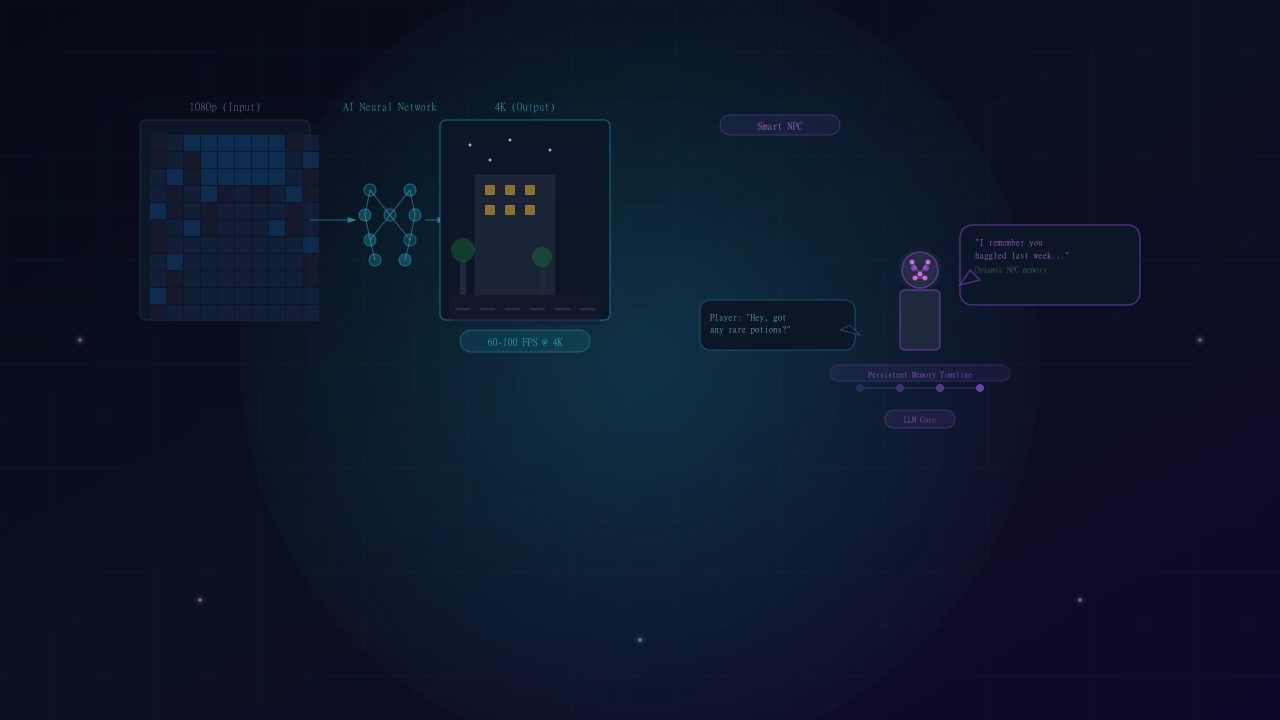
The first thing that comes to mind when people hear AI in gaming is upscaling. Technologies like NVIDIA DLSS, Intel XeSS, and AMD FSR rely on dedicated AI cores inside your graphics card to reconstruct a higher-resolution picture from a lower-resolution render. The result is a crisp image that looks like it is being drawn at a much higher resolution, without the enormous performance cost of doing it on your GPU.
On top of that, AI frame generation does the heavy lifting by inserting completely new, AI-generated frames between the real ones. This can effectively double or even triple your FPS in graphically demanding titles. If your card supports it and the game does too, toggling these features in the in-game settings is the single biggest FPS upgrade you can make.
Take advantage of this: activate DLSS, XeSS, or FSR before you consider buying new hardware. A quick settings change is often all that separates a stuttery session from a smooth high-refresh one.
2. Enhance Audio Quality with AI Noise Cancellation
Communication is crucial in online games, yet the best mic in the world is not worth much if your gameplay is drowned out by background noise, keyboard clicks, and the hum of your fans. This is where AI audio tools come in. Applications like NVIDIA Broadcast and RTX Voice use machine learning models to instantly separate your voice from every other sound in the room.
The result is incredibly clean-sounding voice chat. Your teammates hear exactly what you say and nothing else. AI has become so smart that even a humble webcam microphone can achieve studio-level clarity once AI noise suppression is enabled at the system level.
3. Transform Live Streams into AI-Powered Experiences
Running a live broadcast is a one-person show that demands you play well, monitor your stream, and talk to chat all at once. AI tools are taking a lot of that pressure off your shoulders.
- Real-time gameplay narrators and AI clip creators that instantly capture your best moments, so you never miss a highlight.
- Advanced AI chat moderation and chat summarizers that read messages, answer viewer questions, and translate chat for a multilingual audience while you focus on the game.
“The best streamers in 2026 are the ones who use AI to handle the busywork, freeing themselves up to entertain instead of administer.”
veteran live-streaming community member
4. Polish Roleplay with AI Voice Transformers
Roleplay servers and online game sessions rely on your character stepping into the persona you are virtually playing. AI voice transformers now let players change their voice in real time to match a specific character's tone, whether that's a fantasy hero, a street-level detective, or a mysterious sorcerer. What was once restricted to expensive plugins is now built into streaming apps.
Combined with a decent mic and a little practice, these transformers deliver convincing character work that makes every session feel like a custom-designed production.
5. Talk to NPCs Powered by Large Language Models
Modders are now installing large language models into games, which means the characters you meet can hold real conversations instead of repeating the same lines. With these tools, NPCs respond to whatever you say with remarkably natural language, no matter how off the beaten path you go.
The result is a richer world of quests, dialogue, and role-play. Some newer game engine tools even let you define a character's personality in the backend, then talk directly to your companion as if they were real. It's an experience that was simply impossible until now.
Conclusion
Whether you want faster frame rates, cleaner audio, a more professional stream, or NPCs that actually talk back, there's an AI tool that can get you there. I encourage you to start with the two biggest wins for most players: enabling AI upscaling and frame generation for performance, and AI noise suppression for clarity. From there, experiment and see which tools fit your playstyle, because the best gaming experiences are built with a combination of them.
Sources are linked inline where a claim depends on external reporting.
About the author
Priya NairPriya writes about machine learning systems, developer tooling and the regulation catching up to both. She previously worked as an ML engineer on production recommendation systems.
The Daily Wire
One email. Everything that mattered.
A tight morning briefing on technology, AI and gaming — written by our editors, sent at 07:00 UTC. No sponsored filler, unsubscribe in one click.
We only use your address for the newsletter. See our privacy policy.
Discussion (2)
- Ravi K.2 hours ago
The point about efficiency gains not translating into lower peak power is the part everyone misses. My last build tripped the PSU on transients despite being 200W under the rating.
- Helena W.5 hours ago
Appreciate that the recommendations include 'hold, buy a monitor instead'. Rare to read that in hardware coverage.
Related reading
How to Use AI Agents for Workflow Automation in 2026
Every business runs on repetitive work. Here's how AI agents can read your inbox, judge urgency, and draft responses — without you lifting a finger.
How to Detect AI-Generated Content in 2026
In 2025, spotting AI-written text was easy. In 2026, that game is over. Here's what actually works — and what doesn't.
How to Choose the Right AI Model for Your Use Case in 2026
Most Powerful isn't Most Suitable. Here's how to pick the AI model that actually fits your business — not the one with the most parameters.