How Smart NPCs and AI Upscaling Will Transform PC Gaming in 2026
In 2026, there will be a quiet revolution in PC gaming. Intelligent software that breathes new life into existing rigs has replaced the ostentatious hardware cycles of the past.
· 16 min read
HowToGetVia score
Scored out of 10 after independent testing. We buy or return every review unit.
In 2026, there will be a quiet revolution in PC gaming. Intelligent software that breathes new life into existing rigs and turns static gaming landscapes into dynamic, lifelike places has replaced the ostentatious hardware cycles of the past. Upscaling, which provides high-end visuals without the high-end price tag, and non-player characters who at last feel deserving of the term 'intelligent' are two notable AI-driven changes.
AI Upscaling: Increasing the Prime of Your GPU
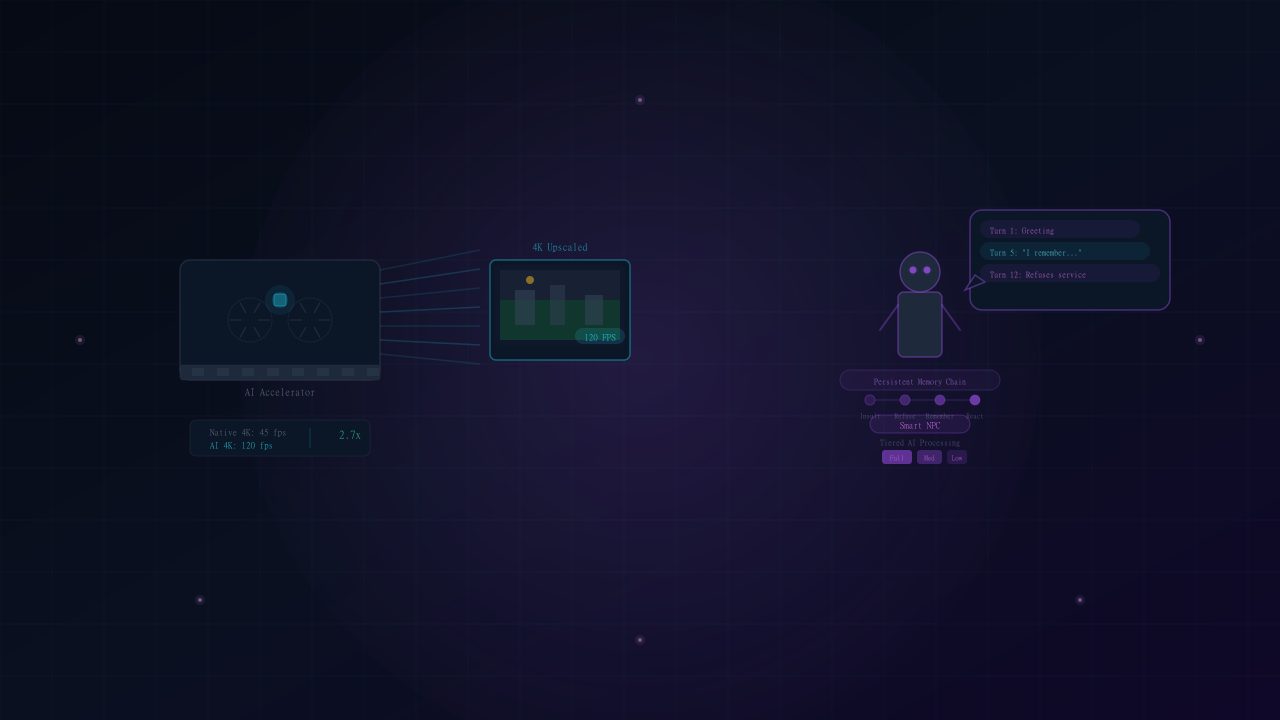
The fundamental process of AI upscaling games in 2026 is quite simple. Every frame is rendered by your graphics card at a lower resolution, frequently as low as 720p or 1080p. The frame is then reconstructed at 4K using a neural network that has been trained on a large collection of high-resolution images, surprisingly accurately filling in the blanks. This isn't just sharpening. The model predicts the appearance of the high-resolution version by analyzing temporal data from several frames and taking motion vectors into account.
A significant improvement in performance is the practical outcome. With the upscaled output, a game that had trouble maintaining 45 frames per second at native 4K can now run at a locked 90 or 120 frames per second, frequently seeming identical to native rendering when in motion. This immediately increases the last-generation graphics cards' functional life. To take advantage of high-refresh-rate screens and ray-traced lighting, you do not need to purchase a new flagship GPU. The software keeps getting better through driver-level updates, and the rendering load is largely transferred to specialized AI accelerators that are already built into your current silicon.
Which Genres Benefit the Most
Not every game gains the same amount from upscaling, and knowing where to expect the biggest wins helps you set realistic expectations. Open-world titles with dense foliage, long draw distances, and heavy particle effects see the largest frame rate gains, since the AI model has more temporal data to work with across static backgrounds. Fast-paced competitive shooters benefit differently: the priority there is input latency rather than raw resolution, so many 2026 titles now offer a 'low-latency upscaling' mode that sacrifices a small amount of image fidelity to keep frame times consistent for competitive play. Story-driven, cinematic games tend to push upscaling the hardest visually, since studios can spend their rendering budget on lighting and character detail instead of raw pixel output.
Beyond the Scripted Loop: Intelligent NPCs
Smart NPCs are revolutionizing the interactive heart of games, while upscaling takes care of visual integrity. Rigid scripts and constrained conversation trees have constrained non-player characters for decades. Compact, on-device language models that operate locally without reliance on the cloud or additional latency are being integrated by developers in 2026.
These intelligent NPCs remember what you do, modify their behavior, and provide speech that is pertinent to the situation in real time. If you insult a blacksmith, they will remember the offense and refuse to fix your equipment hours later. Unprompted, a companion character may remark on your stealthy approach, saying that, based on what they saw, the camp ahead appears to be weakly defended. Instead of cycling through predictable phases, enemy squads respond to your tactics dynamically by coordinating with credible callouts. This turns questing from a set of pre-written chores into an emergent story where your decisions have a lasting impact on the universe.
The Hardware Cost of Smarter Characters
Running a language model locally for every NPC in a crowded scene isn't free, and this is the trade-off developers are still working through in 2026. Most titles solve it with a tiered approach: the handful of characters you're actively interacting with run the full dynamic model, while background crowds fall back to lighter, scripted behavior until you get close enough for it to matter. On lower-end systems, some games let you cap the number of 'smart' NPCs active at once, trading a bit of world reactivity for a steadier frame rate. It's worth checking this setting specifically if you notice stutters in crowded areas like marketplaces or city hubs.
Starting Off: A Useful Switch
Open the graphics menu of any recent major release to explore these AI gameplay tools right now. Look for the upscaling setting, which is usually found under 'Post-Processing' or 'Resolution.' To verify that the functionality is operational and rendering from a reduced internal resolution, select the quality level that strikes a compromise between sharpness and performance for your display. Then, temporarily flip the overlay indication on. Some games classify the sophisticated AI interaction option for NPC behavior under 'Gameplay' instead of 'Graphics.' For stability, this parameter could be turned off by default; turn it on to activate the complete dynamic dialog and memory systems.
Not because you opened the case, but because AI is rewriting what the components can do, your present PC is more competent than it was a year ago. Worlds are smarter, visuals are crisper, and the most important 2026 update is waiting in your settings menu.
Sources are linked inline where a claim depends on external reporting.
About the author
Yuki TanakaYuki reports on console platforms and the Japanese games industry, with a focus on hardware revisions, firmware behaviour and release-window reporting.
The Daily Wire
One email. Everything that mattered.
A tight morning briefing on technology, AI and gaming — written by our editors, sent at 07:00 UTC. No sponsored filler, unsubscribe in one click.
We only use your address for the newsletter. See our privacy policy.
Discussion (2)
- Ravi K.2 hours ago
The point about efficiency gains not translating into lower peak power is the part everyone misses. My last build tripped the PSU on transients despite being 200W under the rating.
- Helena W.5 hours ago
Appreciate that the recommendations include 'hold, buy a monitor instead'. Rare to read that in hardware coverage.
Related reading
How to Become a Tech and Game Reviewer in 2026: The Complete Guide
Turn your passion for gaming and hardware into a career. Here's exactly how to build an audience, get review copies, and become a trusted voice in tech.

How to Use AI Tools for the Ultimate Gaming Experience in 2026
From AI upscaling to smart NPCs powered by language models, here's how AI tools are transforming the way we play, stream, and experience games in 2026.

How to Boost FPS on a Low-End PC: The Complete Guide
Struggling with lag and frame drops? Here's how to squeeze maximum FPS out of your current PC — no new hardware required.